

Shim - Concept
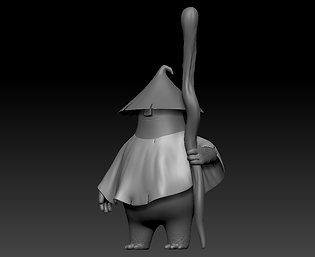
We wanted Shim to have the build of a character who works hard with his hands and has a comforting presence. As a morphological reference, we based him on an old gardener with large hands that would likely be full of dirt, sturdy arms, and a robust body. For the comforting aspect, it was more about the face, the color, and having a slightly rounder shape.
Shim was supposed to be a small human who gardens. We tried on different realistic styles of clothing for Shim. Ultimately, we decided that the most logical choice was for his clothes to be made of the same material as his plants.


Shim being a kind of mushroom allowed us to proceed in our outfit research. The most logical idea was that he would be wearing clothes made of what was found around him : bits of vegetable peels scattered around his environment. One of our big problems was the fact that Shim was too present in the composition of our shots. He had to blend into the background so the focus would be on the decor and not him. This is why his design turned out very simple, with few details and basic shapes. On top of that, his face and especially his eyes are constantly hidden beneath his hat, so that the viewer's gaze would not be attracted to his.
.png)
.png)
As for the textures, we chose a realistic style. The hat would be a piece of onion skin, and the poncho a piece of chopped spring onion in which he could have gotten stuck. The textures of his body are inspired by those of
the button mushrooms and of the hairy mane mushroom : two light-colored fungi
that can change texture or oxidize in case of an impact. His hands and feet are
covered in moldy matter, a kind of greenish layer deposited from a long time
working on his fungi.


Shim - Modeling
In order to create Shim in volume, we started with a MonsterClay sculpt : it's a kind of modeling clay made of oil and wax. It is very smooth and doesn't dry, as opposed to the clay we usually work with that is very sandy and dries in a few minutes. Traditional modeling makes it easier to comprehend the character's volumes before switching to 3D.


After that it's time for retopology : we transform our polygon-heavy sculpt into a light, ready-to-animate model. Shim is a very simple character, so the retopology wasn't very difficult ; we just had to make sure that the geometry was perfect so that he could bend correctly (his shortness makes deformation a bit more complicated than usual).


Shim - Texturing
Textures were a bit more complicated : we needed realistic textures of objects in macro view, something quite unusual that Candice had never done before. Lighting was also a bit of a problem : we chose a rather dark atmosphere, almost nocturnal, given the fact that our story takes place in a closed space. We therefore had to adapt some textures to this peculiar lighting.


Shim's model was imported in Substance Painter. In orded to add on the scales, Candice created several alphas in Photoshop and imported them in Substance to use them as texture stamps. The clothes were textured in the same way before being exported and plugged into Maya, making sure to use the right colorspace in order to avoid any display errors.

Texture Animation
The last challenge was to create a nice transition for Shim's hands' textures : they are first dirty with moldy matter, then cleaned at the midpoint of the story. To make this happen, we had to create a black and white noise texture in Substance Painter, then use it as an opacity mask in Maya to toggle the opacity of the various textures.
